Pada artikel sebelumnya saya telah menjelaskan penggunaan control ListView. Namun dalam artikel tersebut saya belum menyinggung tentang penggunaan GroupTemplate. ListView memiliki kemampuan untuk menampilkan content secara kolumnar seperti yang dimiliki oleh kontrol DataList. Namun penggunaan fitur kolumnar style ini tidak semudah seperti yang dapat kita lakukan terhadap DataList. Disinilah fungsinya GroupTemplate yang terdapat di dalam ListView, untuk membuat tiled layout table.
Saya akan membuat sebuah contoh penggunaan GroupTemplate untuk menampilkan data secara kolumnar yang nantinya akan menampilkan dua buah kolom. Untuk fasilitas paging digunakan DataPager control, sedangkan untuk responsiveness processing saya gunakan UpdatePanel ajax control (favorite control :))...
Ok...daripada berpanjang lebar lebih baik kita langsung aja lihat step by step nya...
1. Firstable...like usually :) add Linq To SQL Classes item to the App_Code folder on your root project...drag n drop the table from the ServerExplorer on to OR Designer...you can use your favorite database...but this time i have created a simple table to display the photo album content...
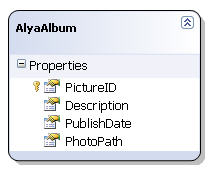
2. Tambahkan LinqDataSource control. Configure datasource nya ke file .dbml yang telah dibuat di langkah pertama.
3. Tambahkan ScriptManager dan UpdatePanel control dari AjaxExtension Toolbox.
4. Tambahkan kontrol ListView. Set DataSourceID property ke id dari LinqDataSource yang telah ditambahkan. Gunakan DataPager control untuk fasilitas paging. Tampilan layout design time nya seperti ini :
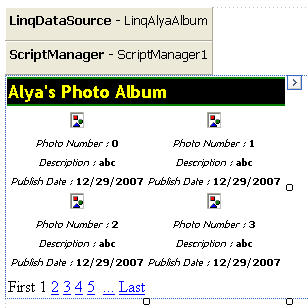
Sekarang mari kita lihat code...
5. Potongan HTML code untuk ContentTemplate ListView control :
1: <ContentTemplate>
2: <asp:ListView ID="lvAlbum" runat="server" DataKeyNames="PictureID"
3: DataSourceID="LinqAlyaAlbum" GroupItemCount="2">
Properti GroupItemCount digunakan untuk menampilkan jumlah kolom yang akan digunakan.
6. HTML code untuk LayoutTemplate ListView control :
1: <LayoutTemplate>
2: <table runat="server" cellpadding="2">
3: <tr runat="server">
4: <td colspan="2" class="header">
5: Alya's Photo Album
6: </td>
7: </tr>
8: <tr runat="server">
9: <td runat="server">
10: <table id="groupPlaceholderContainer" runat="server"
11: border="0">
12: <tr id="groupPlaceholder" runat="server">
13: </tr>
14: </table>
15: </td>
16: </tr>
17: <tr runat="server">
18: <td runat="server" style="">
19: <asp:DataPager ID="DataPager1" runat="server" PageSize="4">
20: <Fields>
21: <asp:NextPreviousPagerField ButtonType="Link"
22: ShowFirstPageButton="True" ShowNextPageButton="False"
23: ShowPreviousPageButton="False" />
24: <asp:NumericPagerField />
25: <asp:NextPreviousPagerField ButtonType="Link"
26: ShowLastPageButton="True" ShowNextPageButton="False"
27: ShowPreviousPageButton="False" />
28: </Fields>
29: </asp:DataPager>
30: </td>
31: </tr>
32: </table>
33: </LayoutTemplate>
7. Perhatikan code di line ke 12...id dari element "<tr>" diisi dengan nama "groupPlaceholder" yang merupakan setting default value untuk layout GroupTemplate...kalau anda ingin mengganti dengan nama lainnya maka harus didefinisikan di GroupPlaceHolderID properti di ListView. "<tr>" ini ibaratnya sebagai placeholder yang nantinya akan di replace berdasarkan template yang terdapat di GroupTemplate.
8. Potongan HTML code untuk GroupTemplate :
1: <GroupTemplate>
2: <tr id="itemPlaceholderContainer" runat="server">
3: <td id="itemPlaceholder" runat="server">
4: </td>
5: </tr>
6: </GroupTemplate>
Elemen "<td>" dengan id "itemPlaceholder" akan direplace berdasarkan layout yang terdapat di dalam ItemTemplate
9. Potongan HTML code untuk ItemTemplate :
1: <ItemTemplate>
2: <td runat="server" style="width:350px" align="center">
3: <asp:Image ID="AlyaImage" runat="server"
4: ImageUrl='<%# "~/images/" + Eval("PhotoPath") %>'/>
5: <br />
6: <span class="item">Photo Number : </span>
7: <asp:Label ID="PictureIDLabel" runat="server"
8: Text='<%# Eval("PictureID") %>' CssClass="content" />
9: <br />
10: <span class="item">Description : </span>
11: <asp:Label ID="DescriptionLabel" runat="server"
12: Text='<%# Eval("Description") %>'
13: CssClass="content" />
14: <br />
15: <span class="item">Publish Date : </span>
16: <asp:Label ID="PublishDateLabel" runat="server"
17: Text='<%# Eval("PublishDate","{0:d}") %>'
18: CssClass="content" />
19: <br />
20: </td>
21: </ItemTemplate>
10. Kita juga dapat menggunakan ItemSeparatorTemplate sebagai pemisah antar item, dan GroupSeparatorTemplate sebagai pemisah antar GroupTemplate...berikut potongan kode HTML nya :
1: <GroupSeparatorTemplate>
2: <tr id="groupSeparator" runat="server">
3: <td colspan="3">
4: <hr />
5: </td>
6: </tr>
7: </GroupSeparatorTemplate>
8:
9: <ItemSeparatorTemplate>
10: <td id="itemSeparator" runat="server"
11: style="border-right: 1px solid #ccc;">
12:
13: </td>
14: </ItemSeparatorTemplate>
11. Berikut code lengkapnya :
1: <%@ Page Language="C#" AutoEventWireup="true" CodeFile="ListViewGroup.aspx.cs" Inherits="ListViewGroup" %>
2:
3: <!DOCTYPE html
4: PUBLIC "-//W3C//DTD XHTML 1.0 Transitional//EN" "http://www.w3.org/TR/xhtml1/DTD/xhtml1-transitional.dtd">
5: <html xmlns="http://www.w3.org/1999/xhtml">
6: <head runat="server">
7: <title>Using GroupTemplate in ListView</title>
8: <style type="text/css">
9: .header
10: {
11: font-family: "Trebuchet MS";
12: font-size: 18px;
13: font-weight: bold;
14: color: #FFFF00;
15: background-color: Black;
16: border-style: solid none solid none;
17: border-top-width: 2px;
18: border-bottom-width: 2px;
19: border-top-color: #00FF00;
20: border-bottom-color: #00FF00;
21: }
22: .item
23: {
24: font-family: tahoma;
25: font-size: 10px;
26: font-style: italic;
27: }
28: .content
29: {
30: font-family: tahoma;
31: font-size: 10px;
32: font-weight: bold;
33: }
34: </style>
35: </head>
36: <body>
37: <form id="form1" runat="server">
38: <div>
39: <asp:LinqDataSource ID="LinqAlyaAlbum" runat="server" ContextTypeName="AlyaAlbumDataContext"
40: TableName="AlyaAlbums">
41: </asp:LinqDataSource>
42: <asp:ScriptManager ID="ScriptManager1" runat="server">
43: </asp:ScriptManager>
44: <asp:UpdatePanel ID="UpdatePanel1" runat="server">
45: <ContentTemplate>
46: <asp:ListView ID="lvAlbum" runat="server" DataKeyNames="PictureID" DataSourceID="LinqAlyaAlbum"
47: GroupItemCount="2">
48: <LayoutTemplate>
49: <table runat="server" cellpadding="2">
50: <tr runat="server">
51: <td colspan="2" class="header">
52: Alya's Photo Album
53: </td>
54: </tr>
55: <tr runat="server">
56: <td runat="server">
57: <table id="groupPlaceholderContainer" runat="server" border="0">
58: <tr id="groupPlaceholder" runat="server">
59: </tr>
60: </table>
61: </td>
62: </tr>
63: <tr runat="server">
64: <td runat="server" style="">
65: <asp:DataPager ID="DataPager1" runat="server" PageSize="4">
66: <Fields>
67: <asp:NextPreviousPagerField ButtonType="Link" ShowFirstPageButton="True"
68: ShowNextPageButton="False" ShowPreviousPageButton="False" />
69: <asp:NumericPagerField />
70: <asp:NextPreviousPagerField ButtonType="Link" ShowLastPageButton="True"
71: ShowNextPageButton="False" ShowPreviousPageButton="False" />
72: </Fields>
73: </asp:DataPager>
74: </td>
75: </tr>
76: </table>
77: </LayoutTemplate>
78: <GroupTemplate>
79: <tr id="itemPlaceholderContainer" runat="server">
80: <td id="itemPlaceholder" runat="server" align="center">
81: </td>
82: </tr>
83: </GroupTemplate>
84: <ItemTemplate>
85: <td runat="server" style="width: 350px" align="center">
86: <asp:Image ID="AlyaImage" runat="server" ImageUrl='<%# "~/images/" + Eval("PhotoPath") %>' />
87: <br />
88: <span class="item">Photo Number : </span>
89: <asp:Label ID="PictureIDLabel" runat="server" Text='<%# Eval("PictureID") %>' CssClass="content" />
90: <br />
91: <span class="item">Description : </span>
92: <asp:Label ID="DescriptionLabel" runat="server" Text='<%# Eval("Description") %>'
93: CssClass="content" />
94: <br />
95: <span class="item">Publish Date : </span>
96: <asp:Label ID="PublishDateLabel" runat="server" Text='<%# Eval("PublishDate","{0:d}") %>'
97: CssClass="content" />
98: <br />
99: </td>
100: </ItemTemplate>
101: <GroupSeparatorTemplate>
102: <tr id="groupSeparator" runat="server">
103: <td colspan="3">
104: <hr />
105: </td>
106: </tr>
107: </GroupSeparatorTemplate>
108: <ItemSeparatorTemplate>
109: <td id="itemSeparator" runat="server" style="border-right: 1px solid #ccc;">
110:
111: </td>
112: </ItemSeparatorTemplate>
113: </asp:ListView>
114: </ContentTemplate>
115: </asp:UpdatePanel>
116: <br />
117: </div>
118: </form>
119: </body>
120: </html>
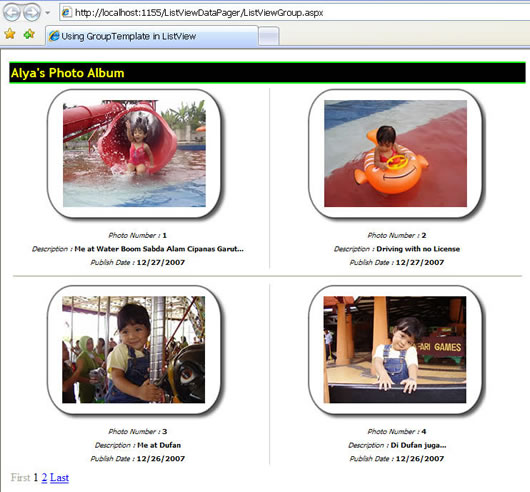
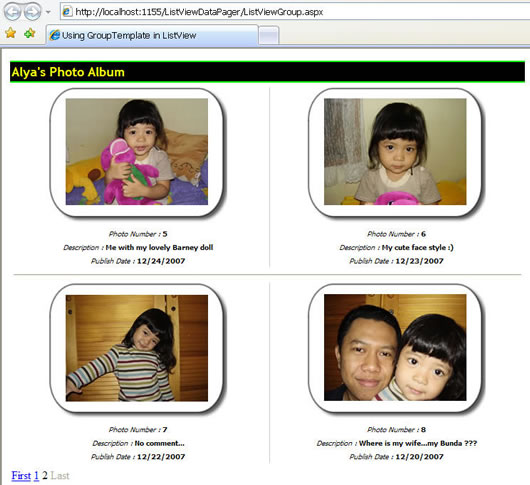
12. Berikut hasil web preview nya :
Ok...sampai disini dulu...c u on the next asp.net 3.5 articles...